Building an Internal Development Environment with Kubernetes Chapter 1: Why Kubernetes?
Hello! I’m Younghoon Jun, a DevOps Engineer on the ML team at HyperAccel.
For those of you reading this, what kind of environment do you develop in? I imagine you’re working in various environments—local setups, SSH server access, cloud services, and more.
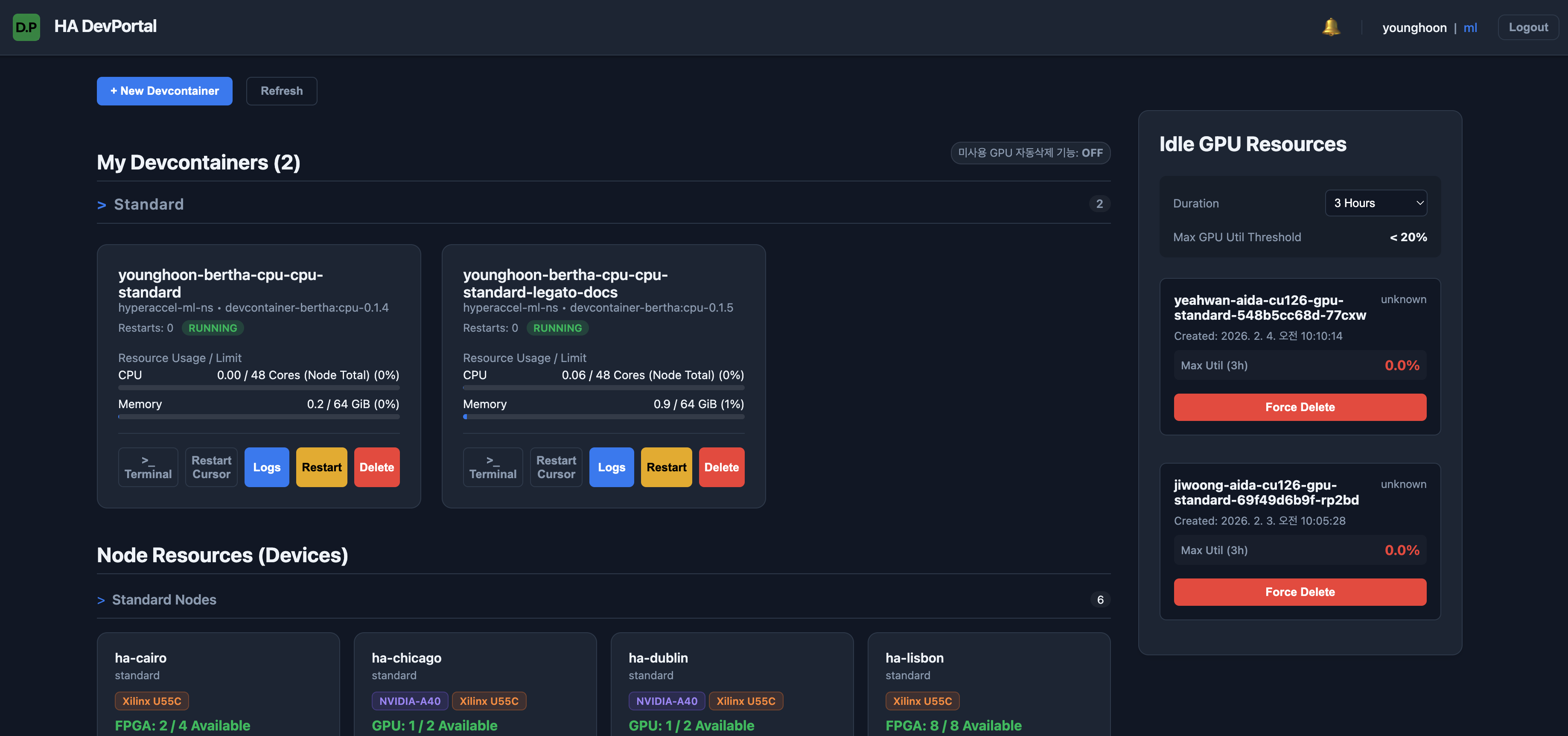
HyperAccel develops on an environment built on top of a Kubernetes cluster. We spin up Pods based on devcontainers pre-configured with the packages needed for development, then connect to the container to do our work. To make things easier for our internal developers, we’ve created and provided a Devcontainer Portal.
However, we didn’t always develop in a Kubernetes environment from the start. In this Building an Internal Development Environment with Kubernetes series, we want to share our journey of building a Kubernetes-based development environment to address developer pain points and provide an efficient development process.
In this first post of the series, we’ll cover the limitations of our previous development environment before Kubernetes and the path that led us to adopt it.
Before Container-Based Development
HyperAccel is a startup that began small, founded by members of KAIST’s CAST Lab.
Given the nature of an early-stage startup, development moved at an incredibly fast pace, making it difficult to establish a systematic development environment. Since this was before I joined HyperAccel, I learned about the development environment at that time through conversations with Hyunjun Park (Author, LinkedIn), one of our founding members on the ML team.
Back then, we were a really small team of about 10 people, and we couldn’t pay much attention to the development environment while trying to meet our goals within tight deadlines. Everyone created their own accounts on the company servers and logged in to use them. If someone was using too many resources, you’d just walk over to their desk and ask when they’d be done. (laughs)
Let’s take a closer look at the challenges that arise when there’s no shared development environment.
Server Management Challenges
If you have 10 servers and 10 developers, you need a total of 100 accounts for everyone to access all servers. Of course, you might think account creation isn’t that difficult if you use automation scripts. However, developing in this environment makes it extremely hard for developers to track whether their work is in sync across different servers. (Even with GitHub, it’s very inconvenient.)
Security and server stability are also concerns. For example, you need additional policies for granting sudo privileges. Furthermore, if a server gets damaged due to a mistake during development (think of drastic examples like sudo rm -rf /…), there’s a cost to recovery.
Package Version Consistency Challenges
When multiple people are working on code together, integrating everyone’s work is essential. If everyone develops in their own isolated environment, version conflicts can arise during integration. You might run into Torch version conflicts, Clang version mismatches, and so on. This is where everyone starts claiming “It Works on my Machine.”

Resource Usage Challenges
HyperAccel’s first-generation chip was built on FPGA. Since FPGA servers are connected in a ring topology, to use them in complete isolation within a server, you had to either use just one server or all of them.
For this reason, without additional configuration, it was difficult for multiple developers to use them simultaneously. (Currently, this works smoothly on our Kubernetes environment. We’ll cover this in detail in a future post on Kubernetes Device Plugins.)
Additionally, for GPUs, checking availability required running commands like nvidia-smi to see running processes or manually checking a dashboard—quite inconvenient.
Introducing Devcontainers
As the company grew and the number of developers increased, we needed a more systematic development environment. To address this, Minho Park (Author, LinkedIn), the ML team lead, built HyperAccel-Devcontainer, a containerized development environment (which we’ll refer to as devcontainer in this post for convenience).
Currently, the devcontainer is provided in two versions. This is to accommodate the different configuration needs of our developers. Each version is built on top of a base image with commonly required packages installed, with version-specific packages and environments configured on top. This allowed us to resolve issues like clang and torch version conflicts that had been problematic before.
Providing a container-based development environment has the advantage that all developers work in the same environment. No more “It Works on my Machine.” Also, since development happens in an isolated environment, we can largely avoid situations where a server gets damaged due to individual mistakes.
However, this container-based development environment still had clear limitations.
Individual Server Accounts Still Required
We still needed to provide individual server access accounts. From a developer’s perspective, development depended on having a server account, and from an administrator’s perspective, account management became another task whenever team membership changed.
Additionally, since individuals had server access, the possibility of server damage from mistakes still existed.
Lack of Development Environment Flexibility
First, developers still needed to manage their own directories on each server, so they remained tied to the server environment. If a specific server went down, developers using that server might face work disruptions if they didn’t have backups and couldn’t track their work. Since we also use servers at external IDCs, if an administrator had to travel to fix a server, work could be delayed even longer.
Additionally, developers need time and effort to learn how to use the container environment. From basic container knowledge to execution procedures and precautions, this can be challenging for developers who aren’t familiar with DevOps.
Unresolved Resource Usage Challenges
FPGA and GPU usage still had constraints. The issues mentioned earlier could still occur in the container environment.
To overcome these limitations and provide a more comfortable development environment, we decided to adopt Kubernetes.
Adopting Kubernetes-Based Devcontainer Development Environment
If you’ve read this far, you might be wondering:
“What exactly is Kubernetes, and why should we use it?”
Before diving into the Kubernetes-based development environment, let me introduce what Kubernetes is and the benefits of building a development environment on top of it.
Container Orchestration
Kubernetes is a Container Orchestration Tool. It’s an open-source platform that makes it easy to deploy and scale containers quickly while automating their management. Beyond being a simple container platform, it aims to be a microservices and cloud platform, serving as a vessel that can easily hold and manage everything built with containers. To put it in one sentence:
A tool that codifies and automates complex infrastructure operations, allowing anyone to consistently deploy, scale, and operate services
Let me explain the concept of Container Orchestration a bit more. In a container-based environment, services are delivered to users in the form of containers. If the number of containers to manage is small, one person can handle issues. But as the organization scales, one person handling all issues becomes impossible. Large-scale environments require operational techniques like:
- Monitoring systems that continuously check whether all services are running normally
- Scheduling, load balancing, and scaling to prevent work from piling up on specific clusters or containers
Container Orchestration is a system that provides features to make managing and operating numerous containers a bit easier and more automated.
About Kubernetes
So far, we’ve looked at what Kubernetes and Container Orchestration are. Next, let’s briefly explore Kubernetes components. The diagram below shows an overview of the essential components that make up a Kubernetes cluster.
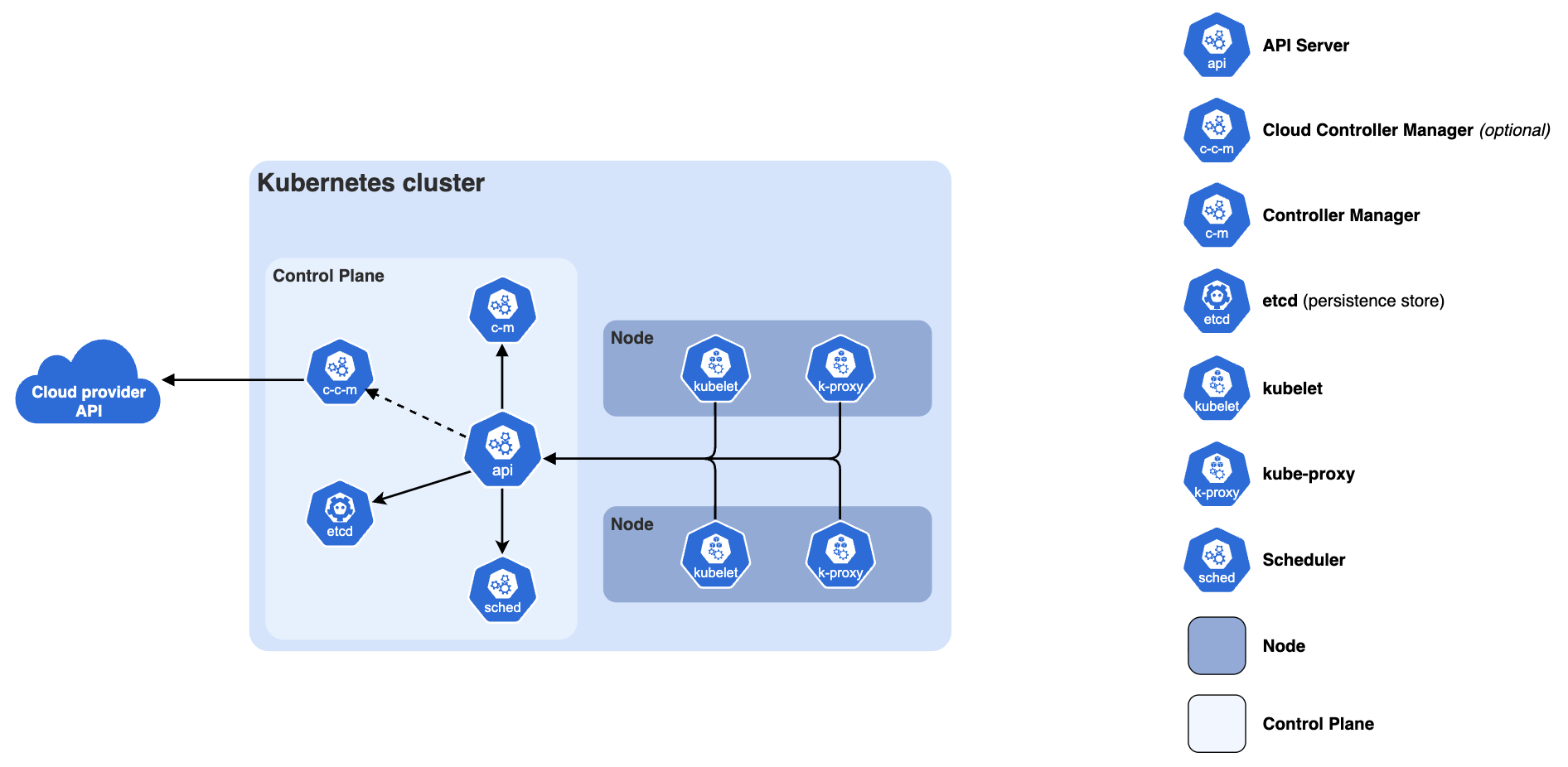
A Kubernetes cluster consists of a Control Plane and one or more Worker Nodes.
Control Plane Components
These manage the overall state of the Kubernetes cluster. They analyze the resource requirements of requested workloads to schedule them on optimal nodes, and enforce the cluster’s overall availability and security policies to ensure system stability.
The components introduced below serve as the central logical layer that defines and manages the overall state (Desired State) of the cluster.
kube-apiserver- The core server component that exposes the Kubernetes HTTP API
etcd- A consistent and highly available key-value store for all API server data
kube-scheduler- Finds pods not assigned to nodes and assigns them to appropriate nodes
kube-controller-manager- Runs controllers to implement Kubernetes API behavior
Worker Node Components
A Worker Node is a physical (or virtual) server that actually performs the tasks (pod execution) assigned by the Control Plane. Simply put, it is the server where pods actually run.
The components introduced below run on every node, maintaining running pods and providing the Kubernetes runtime environment.
kubelet- The node agent that ensures pods and their containers are running
kube-proxy(Optional)- Maintains network rules on nodes to implement services
container-runtime- Software responsible for running containers
We’ve now looked at Kubernetes and its role at the cluster level. So why did we choose Kubernetes for our internal development environment? Next, I’ll explain our reasoning based on the advantages of managing a development environment as a Kubernetes cluster.
Advantages of a Kubernetes-Based Development Environment
What advantages do you get from providing a development environment based on Kubernetes? Let me explain, focusing on how we overcame the limitations of the container-based development environment mentioned earlier.
Fully Isolated Development Environment
With the Kubernetes cluster in place, developers no longer need to access servers directly. Developers simply run their devcontainer in the Kubernetes environment and connect to the container to develop! Infrastructure concerns like node selection and resource management are all handled at the cluster level.
Additionally, you can specify node usage policies at the cluster level to control user access permissions and resource usage. By separating nodes within the cluster by purpose, many pain points for users are eliminated, and abnormal resource usage can be controlled to prevent node downtime.
Flexible Development Environment Operations
Development environments are no longer tied to specific nodes! Even if some nodes go down, pods can be scheduled to other nodes within the cluster. Developer home directories are provided via NFS provisioner on NAS, so you can confidently continue development on a pod running on a different node.
Additionally, since we provide a portal interface to users (which I’ll explain in detail below), once users are granted cluster access, they can start using it with no initial learning curve.
Easy Resource Management
Custom resources like FPGAs and GPUs can be used exclusively at the container level. Kubernetes treats any resources beyond CPU and Memory as custom resources. To use these resources in Kubernetes, you need Device Plugins.
Our cluster currently has Device Plugins configured, and by allocating these resources to containers, you can use them in isolation without interference from other containers.
Building the Kubernetes Cluster and Introducing the Development Environment
In the end, we built a Kubernetes cluster and introduced our internal development environment based on it!!
Let me briefly introduce some of the components currently applied to our Kubernetes cluster that aim to enhance development environment convenience.
High Availability
If you maintain only one Control Plane in Kubernetes, you have a SPOF (Single Point of Failure). If the cluster goes down, all developer work stops—a disaster. To prevent this, we designated 3 nodes as Control Plane and applied
KeepAlivedandHAProxyso that even if a specific node goes down, the cluster continues to operate normally.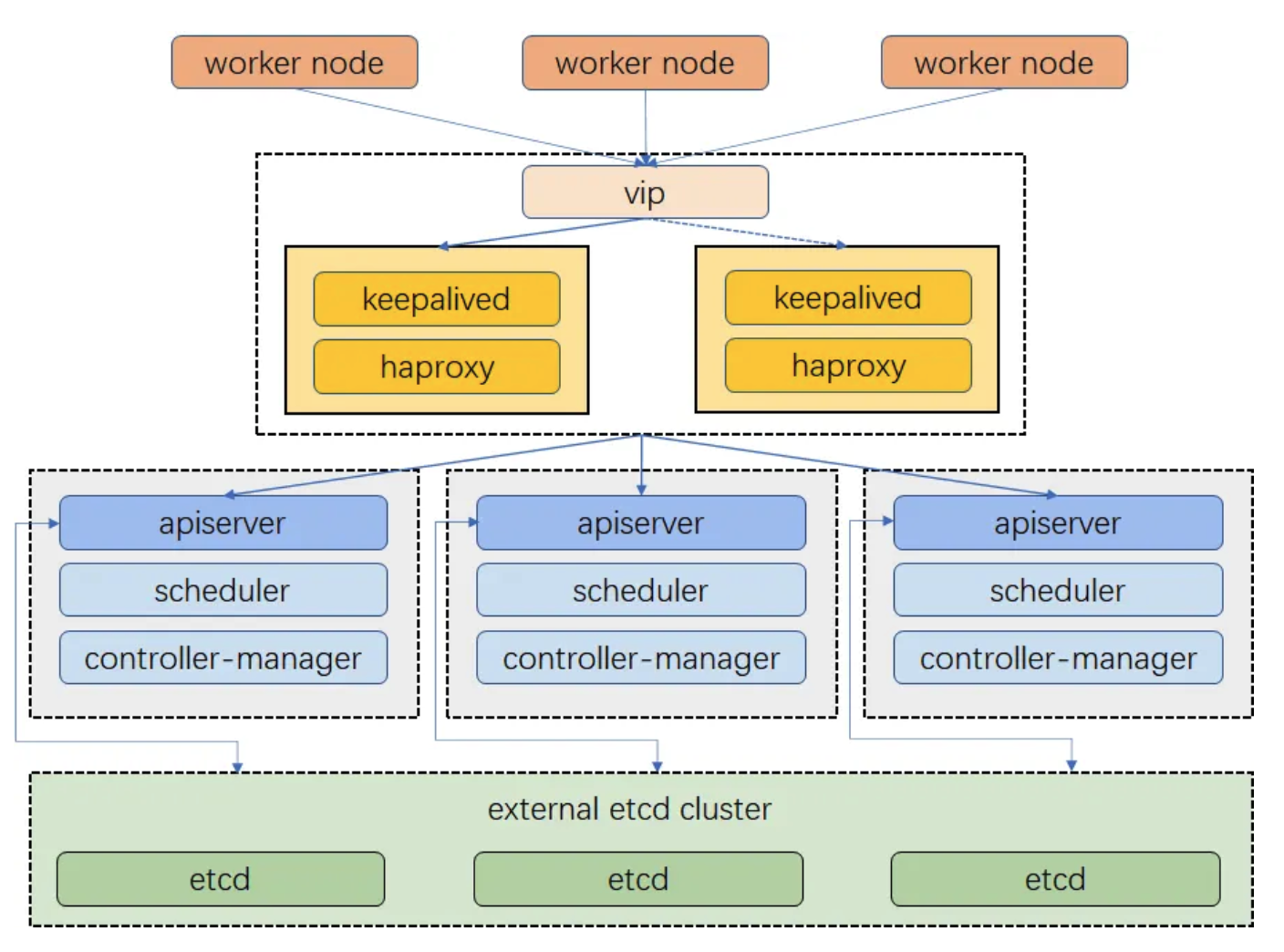
Storage Management
- For management convenience and minimizing network latency, we introduced
Rook-CephandHarborto operate an internal OCI Registry. - We introduced
Nexusto provide an internal PyPi server environment.
- For management convenience and minimizing network latency, we introduced
CI/CD Enhancement
When running CI/CD in the GitHub environment, we previously ran GitHub Action Runners directly on compute nodes. With the Kubernetes cluster in place, we introduced
ARC (Actions Runner Controller)for more stable runner execution.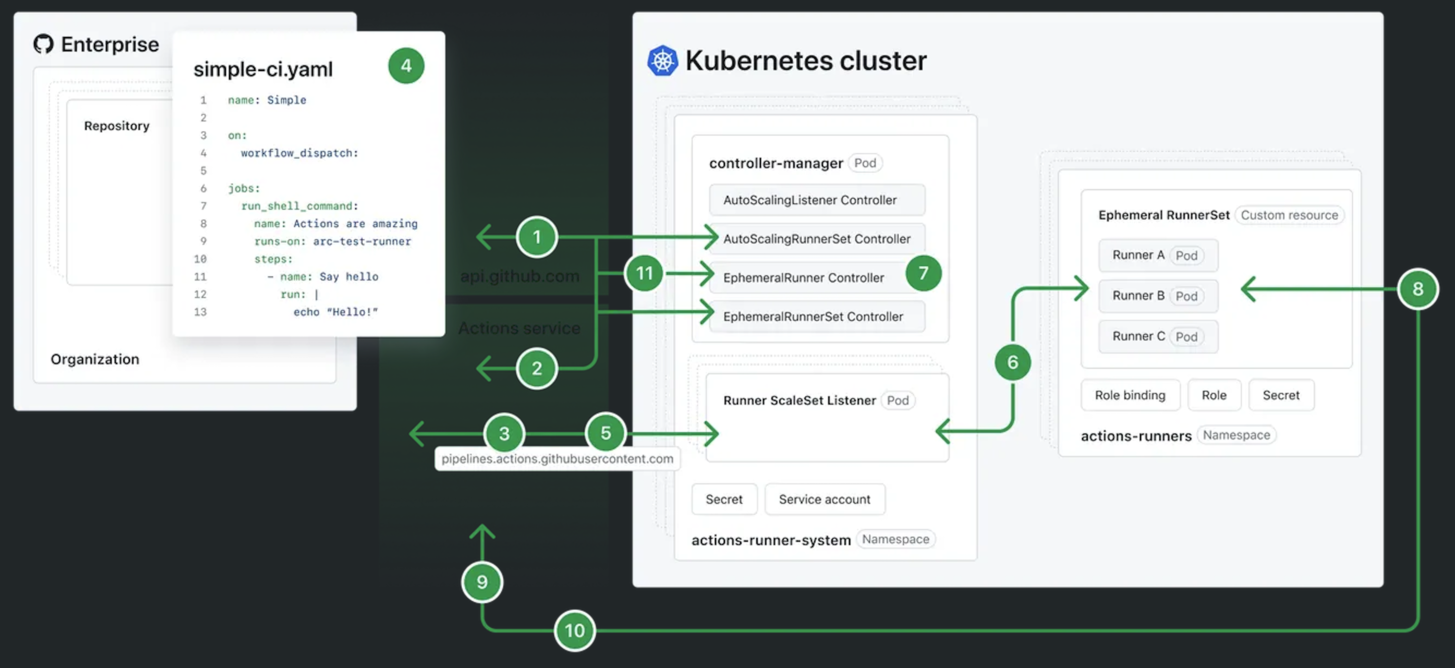
We introduced
Vaultfor centralized secret management and to improve developer access to secrets.
Portal Provision
We created the Devcontainer Portal and provide it to our developers. Let me explain the features of the Devcontainer Portal in more detail.
Container Creation and Deletion
- With just a single button click, you can easily create, restart, and delete containers.
Error Log Checking
- The Portal allows access to the terminal inside the container and viewing Logs. This makes it possible to check errors as soon as they occur.
Kubernetes Cluster Node Monitoring
- It provides information on node hardware resource usage and available remaining resources, so you can check the resources needed for development. Since HyperAccel is a company that builds HW chips, devices are essential for development, and monitoring them properly is important.
Before providing the Portal, we used
Makefileand.envfiles to run pods. This approach caused initial entry barriers and inconvenience for users. To solve this, we applied a GUI approach through the Portal to provide the pod execution environment, and the required specifications are provided usinggo-templateandConfigMap. Developers can now easily launch development environment infrastructure, and monitoring makes log checking convenient, creating an environment where developers can focus more on development.
During my master’s program, I researched scheduling for efficient GPU usage in distributed training environments. I modified the Kubernetes scheduler directly for my research, but only used limited Kubernetes features. Through this project, I gained valuable experience going through the entire process from cluster setup to operation.
Building a Kubernetes cluster for the development environment and figuring out how to increase productivity and convenience for our internal developers was challenging, but it was truly rewarding and enjoyable.
In Summary…
In this post, we covered the first topic in the Building an Internal Development Environment with Kubernetes series: the limitations of our previous development environment and the motivation and process for adopting Kubernetes.
We provided a container-based environment for isolated development under common conditions and adopted Kubernetes to manage it. From the developer’s perspective, infrastructure concerns are minimized, allowing them to focus comfortably on development. From the administrator’s perspective, the environment can be stably managed and issues addressed even as scale increases, greatly improving work efficiency.
In upcoming posts in this series, we’ll introduce what frameworks we’ve added to the Kubernetes cluster to enhance the development environment and boost productivity!
Furthermore, our ML team is developing a software stack to support using HyperAccel’s upcoming ASIC chip on Kubernetes. Kubernetes plays an important role as the foundational infrastructure for LLM (Large Language Model) Serving, one of the most prominent technologies today. We’ll share more about this topic in future posts!
Thank you for your continued interest in our upcoming articles, and thank you for reading to the end!
P.S.: HyperAccel is Hiring!
HyperAccel is a company working on HW, SW, and AI to launch an LLM acceleration ASIC chip. We have talented people across all areas, and in this environment, we’re learning broadly (and deeply!) beyond just one domain, sharing knowledge, and growing together at a rapid pace!
The DevOps part within our ML team provides development environments and management to boost internal developer productivity, and develops software stacks to effectively support LPU chip utilization at the cloud level.
If you’re interested in the technologies we work with at HyperAccel, please apply at HyperAccel Career!